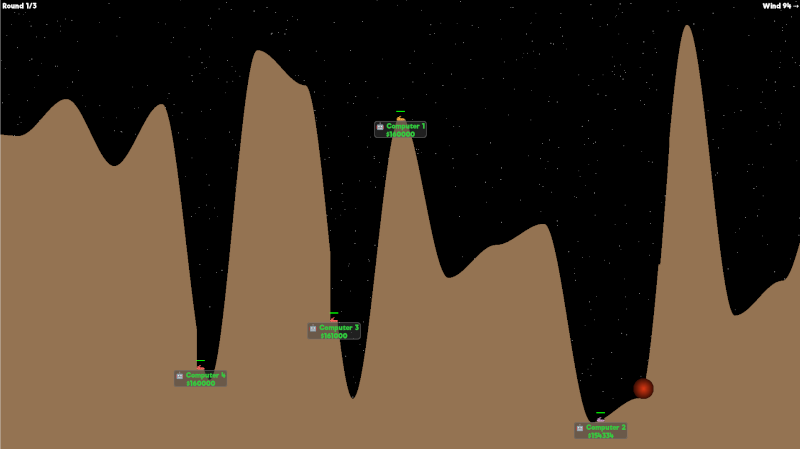
Tanksies is a clone of the early '90s game "Scorched Earth", which you can play on twitch.tv/tanksies by entering commands in chat. It's a four player strategy game where you battle against your opponents until you're the last tank standing.
If you want to play, you !join the pool. Every time a new game starts, four people are picked at random from the pool. When you see the battlefield, you can use commands such as !aim, !weapon, !shield, ... to attack your enemies.
There's a wide range of weapons you can choose from, but you'll have to spend your (virtual) money to purchase them! You earn money by landing a hit on a shield (+$10000), a tank (+$15000), or eliminating a tank altogether (+$50000). Starting funds are $10000. The balance transfers over to the next games you play.
If you want to participate in the game, type !join in chat, and you will be added to the pool of players. At the start of each game, four players will be picked at random. The same four players play for three rounds.
During the "New game" screen, there will be a 30 second countdown before the game starts. It's important to type !ready to acknowledge you still want to play the game. If you don't ready up, you will be swapped out for an AI player.
If you want to leave the pool, you can type !leave.
After each game, the four participants will be removed from the pool, so if you want to play again, you have to type !join again.
The default weapon you start out with is a Baby Missile. You have an unlimited supply of those, and they are free to shoot.
To change your weapon, you can use the full name or the short code of the weapon as such:
!weapon deaths-head
or
!weapon 8
There is a cost associated with firing each weapon, so check your balance under your name to see if you can afford it or not. You can change your weapon during the 30 second preparation countdown as much as you like. Even if you purchased an expensive weapon, it will not be subtracted from your balance until the combat phase starts, so you can swap it out for a cheaper one, even if at first sight your balance might not be high enough.
After the combat phase is done, the same weapon will be used for the next shot and your balance will be deducted again, unless you can't afford it (it will switch to Baby Missile), or you change it to something else manually.
A list of all weapons and associated statistics is available here
The default angle you start at is 45 degrees. Don't forget to account for the wind factor (shown in the top-right corner of the screen) when aiming. To change your turret angle, type:
!aim [0.0 - 180.0]e.g.!aim 47.2
An angle of 0 degrees shoots straight right, 90 degrees straight up and 180 degrees shoots straight left. If you have your angle just about right, and you want to make a small adjustment, you can do so as follows:
!aim ±[0.0 - 180.0]e.g.!aim -0.4
If you're having trouble visualising leftwards angles or you don't want to add 90 in your head to the angle you want to shoot at, you can use the following:
!aim @±[0.0 - 90.0]e.g.!aim @-45 is essentially the same as !aim 135
Changing weapons retains the current turret angle.
The default firing power weapons are fired with is 500. The firing power determines how far the projectile will fly, a number between 0 and 2000. To set the power, type:
!power [0 - 2000]e.g.!power 700
Changing weapons retains the current firing power.
If you want to skip firing for the current combat phase, you can type !holdfire in chat. This can be handy if you are moving your tank, and you don't want to risk blowing yourself up.
Holding fire only lasts for one combat phase. If you want to keep holding fire, you have to repeat the command each combat phase.
Three different types of shields are available: a basic shield, a heavy shield and a force shield. The first two shields absorb incoming projectiles, as well as damage to the tank they protect. The force shield repels incoming projectiles, by bouncing them off. To deploy a shield, type:
| Cost | Durability | |
!shield basic | $6666 | 100 |
!shield force | $8333 | 100 |
!shield heavy | $15000 | 250 |
!shield cancel | cancel current purchase | |
The purchase of the shield is not final until the combat phase has started. Within the 30 second preparation countdown, you can buy or cancel a shield, and it will not affect your balance. Also, if you purchased a heavy shield, within the 30 second countdown, you can change your mind and purchase a basic shield, and only the basic shield will be charged from your balance.
You can move your tank on the battlefield at a cost of $100 per pixel. Specify the direction and distance as follows:
!move <left|right> <distance> e.g. !move left 75
There's two preferences you can set: a flag and a color
To set your flag, find the flag you want and copy the flag-code in the !flag command.
For example, the pirate flag emoji 🏴☠️ has a code of "pirate-flag", which would make the command !flag pirate-flag
The color preference is applied to your name and the tank. The following colors are available:
The command to set the color is !color <color name> e.g. !color orange
The following table shows all weapons, their price and damage. Click on the name of the weapon to go to a short description of what the weapon does.
| Command | Short command | Cost | Dmg/Size | |
| Baby Missile | !weapon baby-missile | !weapon 1 | $0 | 25 |
| Missile | !weapon missile | !weapon 2 | $375 | 50 |
| Baby Nuke | !weapon baby-nuke | !weapon 3 | $3333 | 40 |
| Nuke | !weapon nuke | !weapon 4 | $12000 | 80 |
| Leapfrog | !weapon leapfrog | !weapon 5 | $5000 | 25 |
| Funky Bomb | !weapon funky-bomb | !weapon 6 | $3500 | 30 |
| MIRV | !weapon mirv | !weapon 7 | $3333 | 25 |
| Death's Head | !weapon deaths-head | !weapon 8 | $20000 | 50 |
| Tracer | !weapon tracer | !weapon 9 | $10 | 1 |
| Baby Roller | !weapon baby-roller | !weapon 10 | $500 | 25 |
| Roller | !weapon roller | !weapon 11 | $1200 | 45 |
| Heavy Roller | !weapon heavy-roller | !weapon 12 | $3375 | 60 |
| Dirt Clod | !weapon dirt-clod | !weapon 13 | $500 | 50 |
| Dirt Ball | !weapon dirt-ball | !weapon 14 | $1000 | 25 |
| Ton Of Dirt | !weapon ton-of-dirt | !weapon 15 | $3375 | 100 |
| Liquid Dirt | !weapon liquid-dirt | !weapon 16 | $500 | n/a |
| Dirt Charge | !weapon dirt-charge | !weapon 17 | $1000 | n/a |
| Riot Charge | !weapon riot-charge | !weapon 18 | $200 | n/a |
| Riot Blast | !weapon riot-blast | !weapon 19 | $1000 | n/a |
| Riot Bomb | !weapon riot-bomb | !weapon 20 | $1000 | 60 |
| Heavy Riot Bomb | !weapon heavy-riot-bomb | !weapon 21 | $2375 | 150 |
| Plasma Blast | !weapon plasma-blast | !weapon 22 | $1800 | 125 |
| Laser | !weapon laser | !weapon 23 | $1000 | 100 |
Cost: $0 — Damage: 25
!weapon baby-missile
The Baby Missile is a small explosive of which you have an unlimited free supply. There is a tiny amount of invincibility when firing a Baby Missile, so you can get rid of close by terrain that's in the way.
Cost: $375 — Damage: 50
!weapon missile
The Missile is a larger version of the Baby Missile that does a bit more damage.
Cost: $3333 — Damage: 40
!weapon baby-nuke
The Baby Nuke creates a small nuclear explosion on impact.
Cost: $12000 — Damage: 80
!weapon nuke
The Nuke is a larger version of the Baby Nuke with a larger explosion radius.
Cost: $5000 — Damage: 25
!weapon leapfrog
The Leapfrog consists of three missiles that launch one after the other, when a target is hit.
Cost: $3500 — Damage: 30
!weapon funky-bomb
The Funky Bomb is an explosive that when it hits a target, it explodes in several unpredictable secondary explosions. Watch out for collateral damage!
Cost: $3333 — Damage: 25
!weapon mirv
The MIRV contains five missiles which deploy when the initial projectile reaches apogee. If the first projectile hits a target before reaching apogee, it fizzles out and does no damage.
Cost: $20000 — Damage: 50
!weapon deaths-head
The Death's Head is a larger version of the MIRV, containing 9 missiles, for guaranteed destruction.
Cost: $10 — Damage: 1
!weapon tracer
The Tracer allows you to see the trajectory of a shot.
Cost: $500 — Damage: 25
!weapon baby-roller
As soon as the Baby Roller hits the terrain, it rolls down until it encounters a tank or a valley it can't escape, at which point it explodes.
Cost: $1200 — Damage: 45
!weapon roller
The Roller is similar to a Baby Roller, except it has a higher explosion radius.
Cost: $3375 — Damage: 60
!weapon heavy-roller
The Heavy Roller has the biggest explosion radius of all the Rollers.
Cost: $500 — Size: 50
!weapon dirt-clod
The Dirt Clod generates a small ball of dirt when it hits a target.
Cost: $1000 — Size: 25
!weapon dirt-ball
The Dirt Ball is similar to the Dirt Clod, except it creates a greater sized ball of dirt upon impact.
Cost: $3375 — Size: 100
!weapon ton-of-dirt
The Ton of Dirt is similar to the Dirt Clod and Dirt Ball, except it creates the greatest sized ball of dirt upon impact.
Cost: $500
!weapon liquid-dirt
TODO - not implemented yet
Cost: $1000
!weapon dirt-charge
The Dirt Charge creates a wedge of dirt upon impact.
Cost: $200
!weapon riot-charge
The Riot Charge removes a wedge of dirt around your turret.
Cost: $1000
!weapon riot-blast
The Riot Blast is comparable to the Riot Charge, except it removes a larger wedge of dirt around your turret.
Cost: $1000 — Size: 60
!weapon riot-bomb
The Riot Bomb is a projectile that removes dirt upon impact.
Cost: $2375 — Size: 150
!weapon heavy-riot-bomb
The Heavy Riot Bomb is the same as a Riot Bomb, except it remove a larger diameter of dirt upon impact.
Cost: $1800 — Max damage: 125 — Max radius: 100
!weapon plasma-blast
The Plasma Blast is an explosion that originates from your tank. The diameter of the explosion is determined by the power level you choose (power level 2000 = radius 100), however, the damage that is done is inversely related to the diameter of the explosion (large explosion = low damage, small explosion = high damage).
Cost: $1000 — Max damage: 100
!weapon laser
The Laser shoots in a straight line to your target. The power level you set determines how far the laser reaches. The damage however is inversely propertional to the power level (the higher the power level, the lower the damage).
You can contact me via email at tanksies at zappatic dot net or on Twitter (@zappatic)